Wednesday, August 28, 2013

Quick Links for Term 3 Week 5

First of a number. I get a lot of interesting stuff through my personal learning network. Here’s a quick sample which you can access through this email or through the ICT and Learning Blog

095e3ca6ccf704e389993a319221885c


Great little blog from Tahatai Coast School Year 2 Class. There are some interesting Ipad apps used here….

http://tcsrm8.blogspot.co.nz/


Pounamu is a free, online NZ game set in a future world. Register now to play Pounamu on the 29th and 30th August

http://macdiarmid.ac.nz/newsroom/events/hub/2013/science-savvy-2023

http://blog.core-ed.org/derek/2013/08/using-science-to-create-nzs-future.html


Anyone using rubric generators? These 3 Rubric Makers That Will Save You Time And Stress

http://www.edudemic.com/2013/08/time-saving-rubric-makers/

Do rubrics stifle creativity?

http://www.teachthought.com/teaching/how-to-use-a-rubric-without-stifling-creativity/


Use the free Flickr photo storage site and the free photo editing tools embedded in the site.

http://lauragilchrist.blogspot.co.nz/2013/08/start-flexing-your-photo-muscle-in.html#.Uh0-z_kweSp


Blog site of a NZ quadblogging school --- Melville Int in Hamilton

http://melvilleroom8.blogspot.co.nz/?m=1


Try dividing 1 by 998001. Always good for a discussion

http://www.wolframalpha.com/input/?i=1%2f998001


Learning with Minecraft. here are some ways you could integrate Minecraft into your classroom planning

http://www.teachthought.com/teaching/how-to-use-a-rubric-without-stifling-creativity/


A selection of hand made slow motion science videos:

http://samhankin.co.uk/?portfolio=slow-motion-science/#4


Visual Poetry: Creating word clouds using an Ipad

http://ipadapps4school.com/2013/08/16/visual-poetry-create-word-clouds-on-your-ipad/

Ipad animator:

http://ipadapps4school.com/2013/08/09/create-animations-on-your-ipad-with-abcya-animate/


A guide to Free Image collections on the Web:

http://m.theatlantic.com/technology/archive/2013/08/a-guide-to-the-webs-growing-set-of-free-image-collections/278655/?utm_source=buffer&utm_content=buffer1ba49


Searching intelligently with Wolfram Alpha.

http://www.makeuseof.com/tag/10-surprising-things-you-didnt-know-wolfram-alpha-could-do/


Web Tool of the week – Pinterest – 20 ways it can be used in a library

http://www.edudemic.com/2012/03/20-ways-libraries-are-using-pinterest-right-now/


The future of learning. Interesting graphic….

http://www.knowledgeworks.org/sites/default/files/A-Glimpse-into-the-Future-of-Learning-Infographic_0.pdf


10bc2c45ca00033c1ba25f8ea30790ab

Tuesday, May 21, 2013

Timelines and other stuff; great videos!


Timelines

Here are some tools to help you create timelines. I love using timelines to get children thinking about events in history. Timelines are useful tools which can be used as a graphic organiser. There are also some on our web 2.0 tools site

image


image


http://goo.gl/1D9Xi


Try dipity.com too

http://dipity.com/

image

A List of Apps from Richard Byrne


IOS Apps:  http://ipadapps4school.com/

A list of Android Apps:  http://android4schools.com/


reverse procrast


Videos…….

Videos are a great source of professional Learning for all learners.

This guy is great. Principal of a school in Harlem he is dealing with US educational problems, but some of what he talks about should resonate with us.


It's of Dr Geoffrey Canada, President of the Harlem Children's Zone in New York. Raised in poverty and the son of an alcoholic father, Canada introduces himself as black and mad. What he's mad about is the state of education, and the fact that few people seem to be bothered to do anything about it. He recognises that our traditional system caters well for the top achievers, who go on to be successful as leaders in our communities etc., but that it is hopelessly inadequate in dealing with a vast number of children who are then 'trapped' in the cycle of poverty and underachievement.


A Video from Cyberwise presents a child oriented view on device usage:

http://virtualicteltpd.ning.com/profiles/blogs/what-are-kiwi-kids-are-really-doing-online-a-creative-challenge


 I love the possibilities with creating stop-motion videos. Very easy to create with a tablet or camera and then a video editor.  I’d be happy to help you and your class create something. Have a look at this video. Very simple set up but lots of potential for creativity: (really like the cotton wool burnouts!!)


NASCAR Wizard from DIY on Vimeo.


More videos for your activboard - Has a whole lot of videos from various sources which, as the title suggests are not made for kids, but are good to watch with kids.

http://thekidshouldseethis.com/

Tuesday, March 26, 2013

March 2013

Here are some tools which may help you in your roll as an ICT inquirer…..


With Google Chrome you often end up with lots of tabs open. manage these tabs (and keep your computer running quickly) by using One Tab.

image


Good advice for your eLearning publications

image

http://www.atrixware.com/blog/wp/tips-for-adding-the-right-images-to-your-e-learning-content/?utm_source=twitterfeed&utm_medium=twitter


22 essential skills for the 21st Century teacher. Some links here which might be useful. Various categories.


http://www.educatorstechnology.com/2013/02/the-22-digital-skills-every-21st.html?m=1


One of the tools mentioned above is Audioboo. A great little podcasting tool which is also available as an app for Apple and Android.

image

http://audioboo.fm/about/audioboo


Here’s some examples of a teacher making use of Audioboo.

http://blog.audioboo.fm/2012/12/21/michael-faraday-schools-use-of-audioboo-in-learning-is-electrifying/


Google Earth street view takes you to the top of Everest and other tall peaks.

image

http://www.wired.com/gadgetlab/2013/03/google-summit-maps/?cid=co6617154


Paris doesn’t change…….

image

http://www.rue89.com/rue89-culture/2013/03/24/paris-1914-2013-en-photos-grimpez-dans-notre-fabuleuse-machine-remonter-le


Monday, February 25, 2013

Google Drive

After a long hiatus, the Blog is back.

A lot has happened over the past 18 months and we are now making much more use of Google Drive. This post is a primer on Google Drive. All the things you need to know about using it and leveraging it's strengths. 

Google Drive is principally a cloud based document storage and sharing system. Users are each allowed to store and share 5GB of documents, image, music and other media files. Users are able to access their files from anywhere and from any computer or device. The sharing and collaboration functions allow have great potential for class group work.

 There are also productivity Tools built into Google Drive. The desktop browser version includes: documents(word processor, spreadsheet, presentation tool, Forms (survey tool) and a drawing tool. Documents can be shared by highlighting the document and using one of the two buttons arrowed.


Choose whether to make your document public or choose people you want to share it with:

Printing can be set up via Google Cloud print. At school we have shared class printers with the closest class so that students will generally only have one printer option - their class printer.


Tablets complicate the issue. Both Android  and Apple devices have a Drive app available, which our students use. However the apps do differ slightly. To the best of my knowledge here's what each can do. (At this moment in time!)

Desktop Computer
Android App
Apple App
Full web editing
Basic web editing
Basic web editing
Move docs between folders
Make a copy of a file
-
-
Print
Print
Print
Insert Images
-
-
Insert Tables
-
-
Copy and Paste
Copy and Paste
Copy and Paste
Share
Share
Share
Collaborate
Collaborate
Collaborate

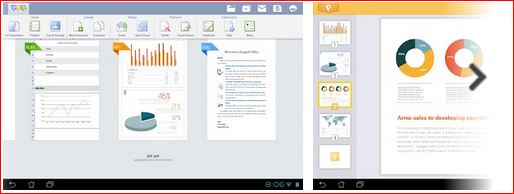
Any functions which Google Drive can't do, can be completed using either Pages (Apple) or Kingsoft Office (Android) or Cloudon for both.. Documents can then be saved back to Google Drive. If you are using the Drive App or Cloudon, documents will be automatically saved in your Drive

Kingsoft Office:


Cloudon:


+++++++++++++++++++++++++++++++++++++++++++++++++++++++++++++++++
Worth a look:

Google Life Project; A Resource of Great Images to Use in Classroom~Educational Technology and Mobile Learning http://t.co/9RyJRLI09J


Friday, July 29, 2011

Elearning Stuff

As we move into the second half of 2011 there are a couple of themes on the ICT Landscape: Elearning and 1 to 1 computing. You may have read about Orewa College’s plans for next year.

iPads in schools - are we missing the point?

Partly pushing all this is the proliferation of elearning apps and opps (opportunities) which have meant that so much learning can be undertaken with just a web browser whether that’s on an ipod, ipad, tablet, phone or computer.  So here are a range of elearning  apps that I have seen in the past couple of months:

First up a dictionary of e-learning Jargon

image

Brainstorming? Gathering ideas? Try Popplet

image


Writing Re-Launched: Teaching with Digital Tools:

Scribblar – Online collaboration – shared whiteboard.

image

Online painting:

image

Create animations online:

image


Students as curators of Information.

image

More educational Apps can be found here:

http://mindshift.kqed.org/2011/06/new-educational-apps-of-the-month-3/

http://theelearningcoach.com/elearning_design/elearning-freebies/

http://classroom.4teachers.org/

http://bigthink.com/ideas/30689

http://dakinane.com/blog/resources/

http://spedapps2.wikispaces.com/

http://playingwithmedia.com/tepsa11-ipad-workshop

Ipad apps: http://appsineducation.blogspot.com/2011/06/apps-for-getting-students-really.html

image

image

image

image

Take your smartphone when you’re out walking? Tree identification App

Khan Academy + http://www.khanacademy.org/#browse ……….. http://www.wired.com/magazine/2011/07/ff_khan/all/1

Scott McLeod : http://bigthink.com/ideas/38698 Why use Twitter??

Older, but excellent example of in depth learning using digital tools:

http://www.thinkinginmind.com/cigar-box-project/ 


Matrix – Technology Integration:

http://fcit.usf.edu/matrix/matrix.php


http://interactioneducation.com/ipadsineducation.html#.ThNRJ4Iod5Y.twitter

Wednesday, May 04, 2011

Adding Content::

Titled because once we have a learning management system up and running, we need to be able to add content which helps us enhance it as a learning tool.


What a great writing idea for older children. Uses a Facebook model (Fakewall) to get students to create a Facebook wall of a famous person. For example Cinderella

image

or John Lennon:

image

http://www.myfakewall.com


Video is very easy to embed as is any other interactive media. Embedding video means you can get rid of all the distractions of other videos and ugly comments on Youtube.

This is a great NZ resource on NZ films and videos. There are some classic music videos too

http://www.nzonscreen.com/

image

And teacher tube has a range of educational videos….

image

And from an inspiration point of view, try Edtalks – a NZ site with a range of addresses from NZ educators

image


Info-graphics make great class talking points too. Have a look at the ones below.


Info-graphic:  Radiation chart:

image

Fun fact: eating one single banana gives you a higher dose of radiation than living 50 miles from a (functional) nuclear power plant for a year.


An InfoGraphic of Number Ones – Every country is number one at something – Guess what we are! Or better still what do you thing Australians are number on at??

http://www.informationisbeautiful.net/visualizations/because-every-country-is-the-best-at-something/#

This one provides a visual representation of how much longer out resources will last.

http://www.trec-uk.org.uk/articles/NS_2007-05-23/26051202.jpg


Inspiration has always been a popular brainstorming / mindmapping application. We have a limited number of licences so Inspiration is not on our computer image by default. There are some alternative web based applications which have the advantage of being free and also being available from home and school.

image

image

image

image

image

image


What’s you reaction to ebooks for children used on a touch pad such as an Ipad?

The future of print: 21 interesting e-books for kids


Why Laptops? The reasoning provided by the ICT Director at Diocesan School for Girls in Auckland for their laptop programme. Compelling information:


Wednesday, August 18, 2010

August 2010

This month, a mixture of videos and links to ICT related information. I’m very keen for us to keep pushing the boundaries with ICT in the classroom – if there is something you want to try,

  • skyping an overseas school
  • editing digital images and video and music
  • online presentations
  • blogging for children
  • using knowledgenet
  • e-reflections
  • e-portfolios

let me know and I will give you a hand. In the meantime, let me know what you think of some of the links below:

TKI

Have you tried the new TKI website?

image


John Hattie

Professor John Hattie asks if teachers in their critical role as change agents, are too focused on the short term horizon - national standards, literacy and numeracy - when they should be focused on using literacy and numeracy to engage more students in the pursuit of learning.

David Warlick

is always worth reading – This post called Technology for 21st Century talsk about the importance of providing children with ready access to computers as opposed to dumping technology on them. Worth considering as we think about 1 to 1 laptop programmes in schools.

http://davidwarlick.com/2cents/?p=2712

and part 2 ……. What ICT is going to help my children learn by helping them to become literate, resourceful, and habitual learners — engaged in a learning lifestyle?

http://davidwarlick.com/2cents/?p=2706

Game Playing

Ewan McIntosh describes how in a “flexible curriculum” games can be used as a basis for creative writing and speaking, across curriculum areas, and for cross-curricular studies.

Handheld Computers

If you think inputting text into handheld devices is slow, take a look at this. Found through Derek Wenmoth’s blog:

http://blog.core-ed.net/derek/2010/08/prepare-to-change-the-way-we-write.html 

50 words a minute! This has some fairly major implications about the way we view and think about handheld devices – at school?

Core Ed’s Top Ten Trends for 2010:

Go to the web page and scroll to the bottom of the page…….

image

Interesting Fact:  Amazon has been selling hardback books for 15 years; it began selling its Kindle reader and the e-books to go with it less than three years ago.

Yet this past spring and early summer, Amazon sold 143 e-books for every 100 hardcover books, a gap that is widening quickly.

Food for Thought:

Monday, May 17, 2010

Reading, Libraries and Mathematics

Booktalks – Connect your class to a NZ author. Have a look at this new resource – Classes can use Skype to set up video interviews.

image

http://www.booktalks.org.nz/

This is a brief presentation on Libraries as the are and as they should be by an American Library expert. Provides food for thought>

Thursday, May 13, 2010

The importance of Social Media

Why we need to take social networking seriously. An update on the statistics:

Wednesday, May 05, 2010

April - May 2010

image

Following on from Mark Treadwell’s talk on Monday, I like the post below from Doug Johnson which reaaly illustrates the point about memory…….

When a good memory works against you

DateFriday, April 30, 2010 at 06:51AM

I was visiting with a local Verizon telephone support person yesterday (we were both chaperones on a middle school field trip - great fun). She made an interesting comment about her job.

When someone calls with a question about his/her cell phone operations, the person providing support is expected to use a database to get the correct answer. If the support person does not go to the database but relies on memory instead, it will result in a negative performance evaluation. Things change so quickly in the field that not checking for the most recent "fix" is irresponsible.

A system that rewards good interpersonal skills and the ability to find and use information? A system in which a good memory is not only unecessary but possibly a liability?

The ability to memorize has always been a critical skill for success in traditional education. (Memorize the capitols of all the countries in Central America, the quadratic equation, today's Spanish vocabulary words, the three branches of government, the dates of World War II ... )

Are we rewarding an obsolete skill set when we give top grades to those with good memories? After all, wouldn't you want your physician, car mechanic, airline pilot, etc. checking for updates rather than relying on a good memory?

Standardised Testing – Sir Ken Robinson

Really worth a listen.

Karen:

image image

Being part of the Schools Loop means we can access the KAREN network for resources such as these:

http://wiki.karen.net.nz/index.php/KAREN_Content

Online magazines:

Online magazines which have content relating to teaching and leaning. Perhaps this is why I need an IPad??

image

http://thejournal.com/home.aspx

image

http://www.bbcfocusmagazine.com/

image

Interface magazine. As you know, the print version of this magazine is well written – aimed at teachers. There is also the website which is worth visiting for links.

Water

A Short video on the reality of bottled water:

image